
OpenCiv3
OpenCiv3 (formerly known by the codename “C7”) is an open-source, cross-platform, mod-oriented, modernized reimagining of Civilization III Conquests by the fan community. Built with the Godot Engine and C#, it has capabilities inspired by the best of the 4X genre and lessons learned from modding Civ III. Our vision is to make Civ III as it could have been, rebuilt for today’s modders and players: removing arbitary limits, fixing broken features, expanding mod capabilities, and supporting modern graphics and platforms. A game that can go beyond Civ III but retain all of its gameplay and content.
OpenCiv3 is under active development and currently in a pre-alpha state. It is a rudimentary playable game but lacking many mechanics and late-game content, and errors are likely. Keep up with our development for the latest updates and opportunities to contribute!
New Players Start Here: An Introduction to OpenCiv3 at CivFanatics
Connect with the community
NOTE:
OpenCiv3 Copyright (c) OpenCiv3 contributorsAll content is the property of the respective authors. For more information regarding the authorship of content, see the applicable source repository logs and/or credits files in the respective directories.
OpenCiv3 seeks to be a mechanically compatible black-box reimplementation of Civilization III. No part or product of Civilization III ships with OpenCiv3. OpenCiv3 reimplements Civilization III gameplay using original code and media produced by the community, based on publicly available information and observations. OpenCiv3 provides the option to load media from the player’s own locally installed copy of Civilization III for a more faithful experience.
OpenCiv3 is not affiliated with or endorsed by civfanatics.com, Firaxis Games, BreakAway Games, Hasbro Interactive, Infogrames Interactive, Atari Interactive, or Take-Two Interactive Software. CIV and CIVILIZATION are registered trademarks of Take-Two Interactive Software, Inc. All trademarks are property of their respective owners.
October 2026: OpenCiv3 v0.3 Dutch 2 Has Been Released!
The OpenCiv3 team is pleased to announce the second release of the v0.3 “Dutch” milestone. This is a significant enhancement over the first “Dutch Preview 1” release, introducing many new features including the ability to win the game! Conquest and Domination victory types are available. Other highlights include our new title screen music in standalone mode; a greatly improved domestic advisor; expanded game setup options; and the introduction of unit bombardment, transport, and promotion mechanics. A local installation of Civilization III is still recommended for a more polished experience.
See the release announcement at CivFanatics for the full list of new features.
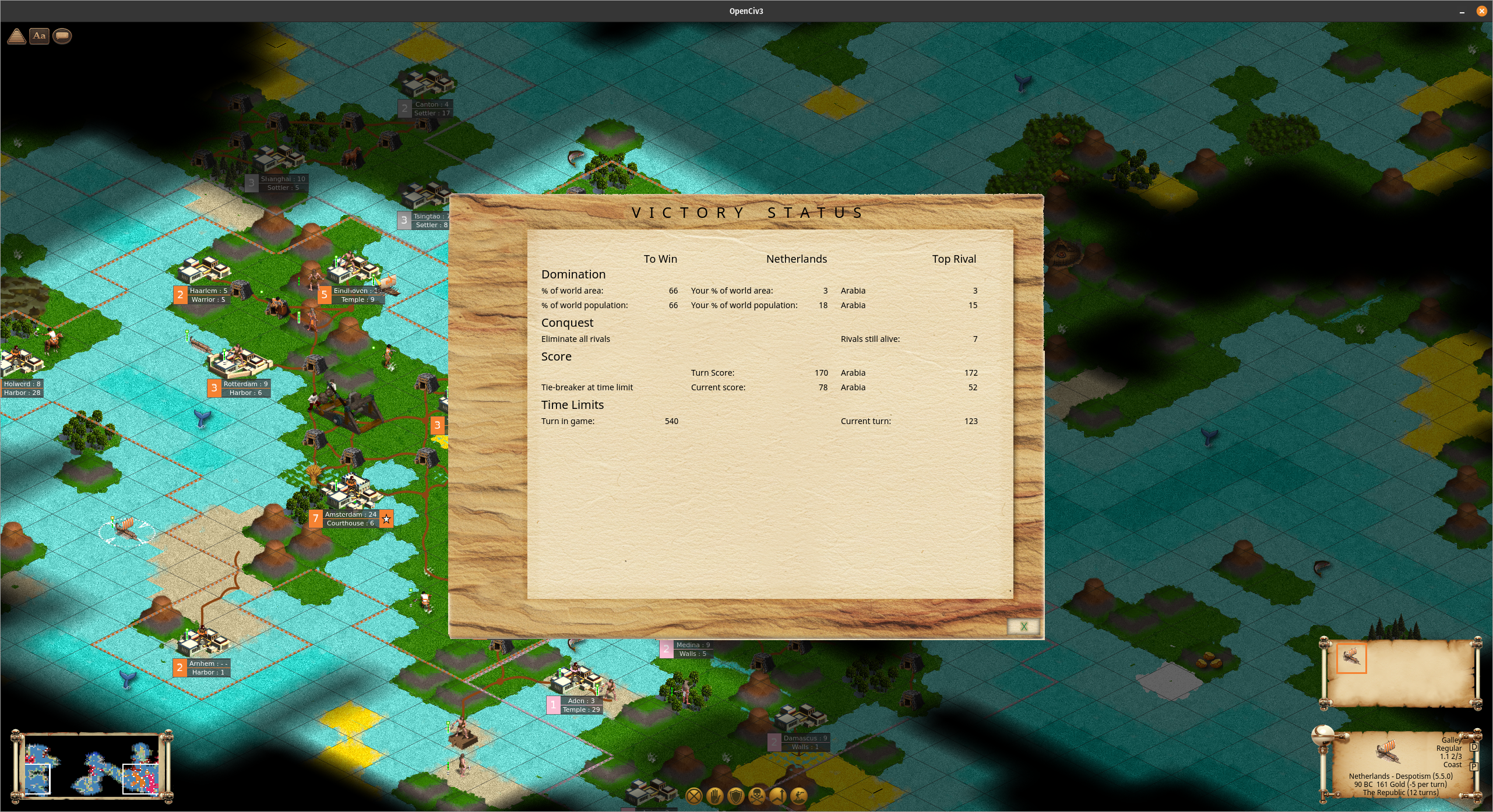
OpenCiv3 Dutch 2 in standalone mode showing victory status
Download
Download the appropriate zip file for your OS from the Dutch 2 release
All official releases of OpenCiv3 along with more detailed release notes can be found on the GitHub releases page.
Install
System Requirements
- 64-bit Windows, Linux, or Mac OS. Other platforms may be supported in future releases.
- Minimum hardware requirements have not yet been identified. Refer to Godot’s system requirements as a baseline. Please let us know if OpenCiv3 does not perform well on your system, or how it does on a particularly old system.
- Currently the OpenCiv3 installation is about 200-300 Mb but this is expected to increase significantly as we add media.
- Recommended: A locally installed copy (the game itself does NOT have to run) of Civilization III Conquests or Complete edition. Standalone mode is available with placeholder graphics for those who do not have a copy.
Windows Installation
This is a Windows 64-bit executable. OpenCiv3 will look for a local installation of Civilization III in the Windows registry automatically, or you may use an environment variable to point to the files.
- Download and extract the zip file
- Double-click
OpenCiv3.exe - If it is blocked, you may need to unblock it by
- Right click
- Click on Properties
- Check the “Unblock” checkbox near the bottom buttons in the “Security” section
- Click OK
- If your Civilization III installation is not detected, you can set the environment variable
CIV3_HOMEpointing to it and restart OpenCiv3
Linux Installation
This is an x86-64 Linux executable. You may use an environment variable to point to the files from a Civilization III installation. You can just copy or mount the top-level “Sid Meier’s Civilization III Complete” (Sans “Complete” if your install was from pre-Complete CDs) folder and its contents to your Linux system, or install the game via Steam or GOG.
- Download and extract the tgz file
- Set the
CIV3_HOMEenvironment variable to point to the Civ III files, e.g.export CIV3_HOME="/path/to/civ3" - From that same terminal where you set
CIV3_HOME, runOpenCiv3.x86_64 - To make this variable permanent, add it to your
.profileor equivalent.
Mac Installation
This is a universal 64-bit executable, so it should run on both Intel and M1 Macs. You may use an environment variable to point to the files from a Civilization III installation. You can just copy or mount the top-level “Sid Meier’s Civilization III Complete” (Sans “Complete” if your install was from pre-Complete CDs) folder and its contents to your Mac system, or install the game via Steam or GOG.
- Download the zip; it may complain bitterly, and you may have to tell it to keep the download instead of trashing it
- Double click the zip file, and a folder including
OpenCiv3.appand others will appear - If you try to open
OpenCiv3.appit will tell you it’s damaged and try to trash it; it is not damaged - To unblock the downloaded app, from a terminal run
xattr -cr /path/to/OpenCiv3.app; you can avoid typing the path out by typingxattr -crand then dragging theOpenCiv3.appicon onto the terminal window - Set the
CIV3_HOMEenvironment variable to point to the Civ III files, e.g.export CIV3_HOME="/path/to/civ3" - From that same terminal where you set
CIV3_HOME, runOpenCiv3.appwithopen /path/to/OpenCiv3.app, or again just typeopenand drag the OpenCiv3 icon onto the terminal window and press enter - See the wiki for more guidance
Troubleshooting and Known Issues
Compatibility
- OpenCiv3 uses many primitive placeholder assets; loading files from a local Civilization III install is recommended (see platform specific setup instructions above)
- Support for playing Civ III BIQ or SAV files is incomplete; some files will not load correctly and crashes may occur
- Likewise support for OpenCiv3 JSON files (rules and saves) is not yet stable across different versions and they may or may not be reusable.
- The Palace view is not yet supported in standalone mode; it opens an invisible overlay that can be closed by pressing Esc.
Game config and logging:
- By default OpenCiv3 expects the general config file
C7.iniand main log filelog.txtto exist in the same directory as the game itself and be writable. It is recommended to install the game to a writable location such as under your user home directory. If the game folder is NOT writable, settings and logs are stored in a per-user Godot data folder instead. Resolved paths and Civ III install detection is now saved inlog.txt, so it’s easier to troubleshoot if the game can’t find your Civ III files. See here for more details on user data folder locations. - If you need to set or change the location of Civ III later, or something goes very wrong and the game cannot launch, delete
C7.iniand restart the game. - If you encounter a crash, an error dialog for a reason not listed here, or other major problem that you cannot troubleshoot, find
log.txtas described above and submit it to us in a GitHub issue or on Discord.
Mac:
- Mac will try hard not to let you run this; it will tell you the app is damaged and can’t be opened and ask to move it to Trash. From a terminal you can run
xattr -cr /path/to/OpenCiv3.appto enable running it. - See the wiki for more guidance
Other specific bugs will be tracked on the GitHub issues page.
© OpenCiv3 contributors. OpenCiv3 is free and open source software released under the MIT License.